


Apple TV: Shows, Movies & More
4.5593.00 Reviews
App Specs
- Version
- 16.4.0
- Updated On
- License
- Free
- Downloads
- 10,000,000+
- Developer
- Apple
- Categories
- Entertainment
- Platform
- Android
Screenshots
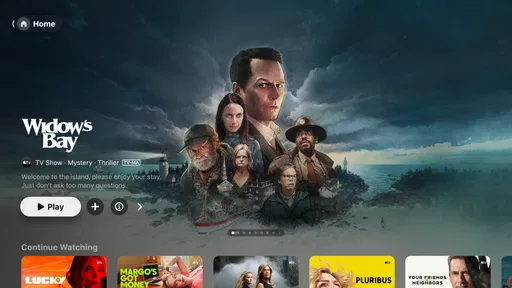

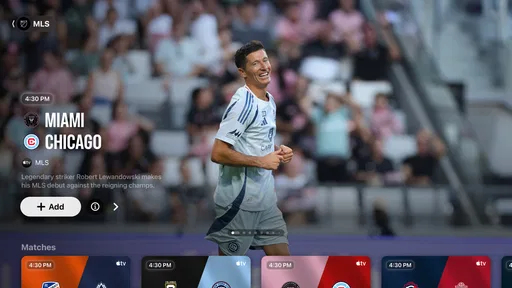
 Analysis by AppCompare
I’d approach the Apple TV app as a place to find and watch entertainment, not as a guarantee that every show you see is included with one subscription. That distinction matters on a first visit: the app brings together Apple’s own programming, live sports, and other viewing options, but what you can play may depend on the title and the service behind it. Once I understood that, browsing felt much less confusing. It works best as a viewing hub when you want help deciding what to watch, rather than as a single all-inclusive library.
Apple makes the app, which sits in the entertainment category. It’s free to install, has a Teen content rating, and its current version is 16.1.0; the listed minimum operating system is 8.0. The app has a 4.4 average from around 6,600 ratings and more than 10 million installs. Those figures suggest it has a broad audience, but they don’t tell you whether its mix of content suits your household. I’d decide based on what you actually watch and which devices you use.
What you can expect when you open it
The first useful thing to know is that browsing and watching aren’t always the same step. A title can catch your eye in a recommendation or a collection, yet access may depend on the service or purchase associated with it. In practical terms, I’d treat the home screen as a guide to available viewing, then check the title’s playback options before settling in. That simple habit helps avoid the familiar disappointment of choosing a film and only then discovering that it requires another route to watch.
Apple Originals give the app a clear identity, while live sports and other programming broaden its appeal. Still, the range is not automatically a reason to use it as your only streaming destination. If you mainly want a particular catalogue or already know which service has the show you’re after, opening that service directly can be quicker. The Apple TV app makes more sense when you’re undecided, want to explore, or prefer a central starting point.
A calmer first setup
Hey there! So, I've been diving deep into the magical world of Apple TV, and let me tell you, it’s been quite the ride. Whether you’re a die-hard Apple fan or just someone who loves a good binge-watch session, this app might just be your new best friend.
Setting Up: Easy Peasy
First things first, setting up the Apple TV app is a breeze. Like, seriously, it’s as simple as pie. Once you download it and get your Apple ID in there, you’re pretty much good to go. The interface is super sleek and intuitive, which is exactly what you’d expect from Apple, right? It’s like they knew I didn’t have time to fuss around with complicated setups.
Content Galore
One of the best things about this app is the sheer amount of content it offers. I mean, there’s something for everyone. From exclusive Apple Originals to a variety of channels and streaming services, the options are endless. I found myself scrolling through and thinking, "Wow, I didn’t even know I wanted to watch this, but now I do."
Worth Reading Before You Choose

EA SPORTS FC Mobile 26 Is a Bigger Football Game, but It Takes Time

Flipboard Shows What News Apps Must Do Beyond the Feed

Switching to Android Auto Means Rethinking Your Driving Routine

Google Calendar Makes a Crowded Week Easier to Manage

Ludo King Makes the Most of the Minutes Between Plans

Baby Panda World Brings Quick Play to Modern Phones, but Its Game Library Feels Busy
There’s a handy “Watch Now” section that’s basically your personal concierge. It suggests shows and movies based on what you’ve watched, and honestly, it’s scary how well it knows me. It’s like having a friend who always knows what you’re in the mood for.
Getting to the first good watch
When I’m trying the app for the first time, I don’t begin by scrolling through every row. I pick a familiar kind of viewing—an episode, a film, or a live event I already know I want—and use the app to see what route it offers. That gives me a quick sense of whether the title is included, connected to another service, or presented as a separate purchase. It’s a small check, but it makes the first session feel purposeful instead of like endless browsing.
If I’m not sure what to choose, I use Watch Now as a shortlist rather than treating its suggestions as a verdict. Recommendations are useful when I’m open to discovery, but they can reflect past viewing in ways that don’t match tonight’s mood. A practical trick is to browse with a specific constraint: something short, a particular genre, or a programme everyone in the room can watch. That turns a broad catalogue into a manageable choice.
Where the convenience has limits
The app’s central role can make it feel as if everything is under one roof, but it doesn’t erase differences between services, channels, and purchases. I’d check the viewing option on a title before assuming it is part of what I already pay for. In-app purchases are listed from $9.99 to $199.99 per item, so it’s worth slowing down at any purchase prompt and confirming exactly what the transaction covers. The free app itself is not the same thing as free access to every piece of entertainment shown inside it.
That trade-off is common to viewing hubs: they can save time when you’re exploring, but a direct app may be clearer when you have one specific service in mind. I also wouldn’t choose this as a replacement for a service whose catalogue and discovery tools already fit my habits. Its strongest role is helping me move from “I want something to watch” toward a concrete choice, not necessarily replacing every other app I use.
Content Galore
One of the best things about this app is the sheer amount of content it offers. I mean, there’s something for everyone. From exclusive Apple Originals to a variety of channels and streaming services, the options are endless. I found myself scrolling through and thinking, "Wow, I didn’t even know I wanted to watch this, but now I do."
There’s a handy “Watch Now” section that’s basically your personal concierge. It suggests shows and movies based on what you’ve watched, and honestly, it’s scary how well it knows me. It’s like having a friend who always knows what you’re in the mood for.
Making the app fit an ordinary evening
Here’s a realistic way I’d use it: after dinner, I have a little time before bed and don’t want to compare several streaming apps. I open Watch Now, scan a few suggestions, and choose one programme that suits the time I have. Before pressing play, I check the title’s access route so there’s no surprise purchase or service switch. If the first suggestions feel off, I search by the kind of thing I want rather than continuing to scroll. That combination—browse, verify, then play—is more reliable than expecting recommendations to read my mind.
For a household, the same approach can reduce the usual remote-control debate. Each person can bring a clear preference, and the group can use the app to explore options together. But shared viewing still calls for a quick age-appropriateness check; a Teen rating for the app doesn’t mean every individual programme is suitable for every child. I’d use the available parental restrictions as a practical safeguard, then make the final choice based on the specific title.
Seamless Integration
Another cool feature is how well it plays with other devices. If you’re already in the Apple ecosystem, this app is like the missing puzzle piece. You can easily switch from watching on your iPhone to your iPad or even your MacBook without missing a beat. The handoff is seamless, and it feels like magic.
Plus, if you’re into HomeKit, you can even control your Apple TV with Siri. Just imagine lying on the couch, too comfy to reach for the remote, and just saying, "Hey Siri, play the next episode." Pure laziness, but I’m not complaining!
Using recommendations without getting stuck
Watch Now is most helpful when I treat it as a starting point, not a complete map of everything I could watch. If one recommendation leads to a title that needs a different service, I decide whether that detour is worth it before investing more time in the suggestion. This avoids a common frustration with aggregated browsing: a promising poster can be easy to find even when the actual viewing path is less convenient.
Switching between Apple devices is a real advantage for someone who moves around the home or starts an episode on one screen and continues elsewhere. It matters less if I watch exclusively on a single device, and it won’t by itself make the app compelling to someone who doesn’t use Apple hardware. I’d consider that convenience a bonus, not the main reason to install it.
Family Sharing: Keeping Everyone Happy
Got a family? No worries! The Family Sharing feature lets up to six family members share purchases from the App Store, iTunes, and more without sharing accounts. Everyone gets their own personalized experience, which is a lifesaver if your taste doesn’t exactly align with your kids'.
It’s also great for parental controls. You can set up restrictions so the little ones don’t accidentally stumble into something they shouldn’t. Peace of mind, right?
Who will get the most from it
I’d recommend trying the app if you already watch Apple Originals, want to keep an eye on live sports, or often forget which service has the film you’re looking for. It can also suit Apple-device households that value moving between screens. On the other hand, if you want one tightly defined catalogue, dislike hopping between services, or mainly use a non-Apple setup, a dedicated streaming app may feel more direct. The choice depends less on how many tiles appear and more on whether the app helps you reach something you genuinely want to watch.
Family Sharing can make shared purchases and separate preferences more manageable, but it’s worth understanding what is being shared before relying on it as a universal family subscription. It doesn’t remove the need to check access conditions for each title. For a first-time user, I’d set up the household arrangements deliberately, then test with one known item so everyone knows what to expect before movie night.
Catchy Originals
Now, let’s talk about those Apple Originals. I’ve been hooked on a few of them, like "Ted Lasso" and "The Morning Show." The production quality is top-notch, and you can tell they’ve spared no expense. It’s like having a mini-cinema experience right in your living room.
What’s awesome is that they keep adding new content, so there’s always something fresh to check out. If you’re into exclusive shows and movies, this is a huge selling point.
Questions worth settling before you commit
Is it free to install? Yes, the app is free, though some viewing choices can involve in-app purchases or access through another service. Do I need an Apple device to make it worthwhile? The app is most naturally at home in an Apple-device setup, but the best test is whether it runs on the device you plan to use and whether its available viewing options match your needs. Can I assume every title is included? No: I check the playback route and any payment prompt title by title.
Is it suitable for children? The app carries a Teen rating, and parental restrictions can help, but I still judge each programme separately. Is it better than opening individual streaming services? When I’m undecided, a central place to browse can be more convenient; when I know exactly where a title lives, going directly to that service may be faster. Those are the practical questions I’d answer before making it part of my regular routine.
Catchy Originals
Now, let’s talk about those Apple Originals. I’ve been hooked on a few of them, like "Ted Lasso" and "The Morning Show." The production quality is top-notch, and you can tell they’ve spared no expense. It’s like having a mini-cinema experience right in your living room.
What’s awesome is that they keep adding new content, so there’s always something fresh to check out. If you’re into exclusive shows and movies, this is a huge selling point.
My practical next step
If you’re new to it, I’d install the app, sign in, and choose one title you already want to see. Check how it can be watched before you browse further, then try Watch Now for a second option if you feel like discovering something. That gives you a useful first session without turning setup into a project. Apple’s app has been around since November 3, 2020, and the listed in-app purchase range is $9.99 to $199.99 per item; I’d keep that range in mind whenever I’m evaluating a purchase rather than treating the free download as a promise of free viewing.
Final Thoughts: Is It Worth It?
So, here’s the million-dollar question: Is the Apple TV app worth it? In my opinion, absolutely. It’s a fantastic tool for anyone who loves streaming and wants to have all their content in one place. The integration with other Apple devices is seamless, the content library is vast, and the user experience is top-notch.
If you’re already in the Apple ecosystem, it’s a no-brainer. Even if you’re not, the app still offers a lot of value with its exclusive content and ease of use. So, give it a shot and see if it’s a fit for you. Happy watching!
Pros
- Intuitive interface for easy navigation.
- High-quality streaming with minimal buffering.
- Wide range of content available.
- Integration with Apple ecosystem.
- Supports multiple user profiles.
Cons
- Limited third-party app support.
- Requires stable internet connection.
- Content library varies by region.
- Costly compared to other streaming options.
- No offline viewing option.
FAQs for Apple TV: Shows, Movies & More
What is Apple TV and how does it work?
Apple TV is a digital media player and streaming device from Apple that allows users to watch movies, TV shows, and live television. It connects to your TV and streams content from various services, such as Apple TV+, Netflix, Hulu, and more. The device is controlled using a remote or your iOS device, offering a seamless viewing experience.
What content is available on Apple TV?
Apple TV offers a wide range of content including movies, TV shows, documentaries, and live sports. You can access content from Apple TV+, as well as third-party streaming services like Netflix, Disney+, and Amazon Prime Video. Additionally, it supports apps for news, music, and games, providing comprehensive entertainment options.
Do I need an Apple device to use Apple TV?
No, you don’t need an Apple device to use Apple TV. While the device integrates well with Apple products, it is compatible with any TV that has an HDMI port. You can control Apple TV with its dedicated remote, or use the Apple TV app on compatible iOS devices for added convenience.
Is there a subscription fee for using Apple TV?
Apple TV itself does not require a subscription. However, accessing content may involve subscriptions to services like Apple TV+, Netflix, or other streaming platforms. Apple TV+ offers original shows and movies at a monthly or annual fee, and new users might be eligible for a free trial.
How does Apple TV compare with other streaming devices?
Apple TV is known for its high-quality video and audio output, seamless integration with other Apple services, and a user-friendly interface. Compared to other streaming devices like Roku or Amazon Fire Stick, it tends to be pricier but offers exclusive content through Apple TV+ and superior performance with its powerful hardware.


